Notas sobre conceptos básicos del desarrollo con contenedores Docker y Kubernetes. Se incluyen también el código de bastantes ejemplos para ilustrar los conceptos descritos.
Docker
-
Proyecto Open Source 2013
-
Revolución en el desarrollo y despliegue de aplicaciones
-
Plataforma para que desarrolladores y administradores puedan desarrollar, desplegar y ejecutar aplicaciones en un entorno aislado denominado contenedor
-
Docker permite separar las aplicaciones de la infraestructura acelerando el proceso de entrega de software a producción
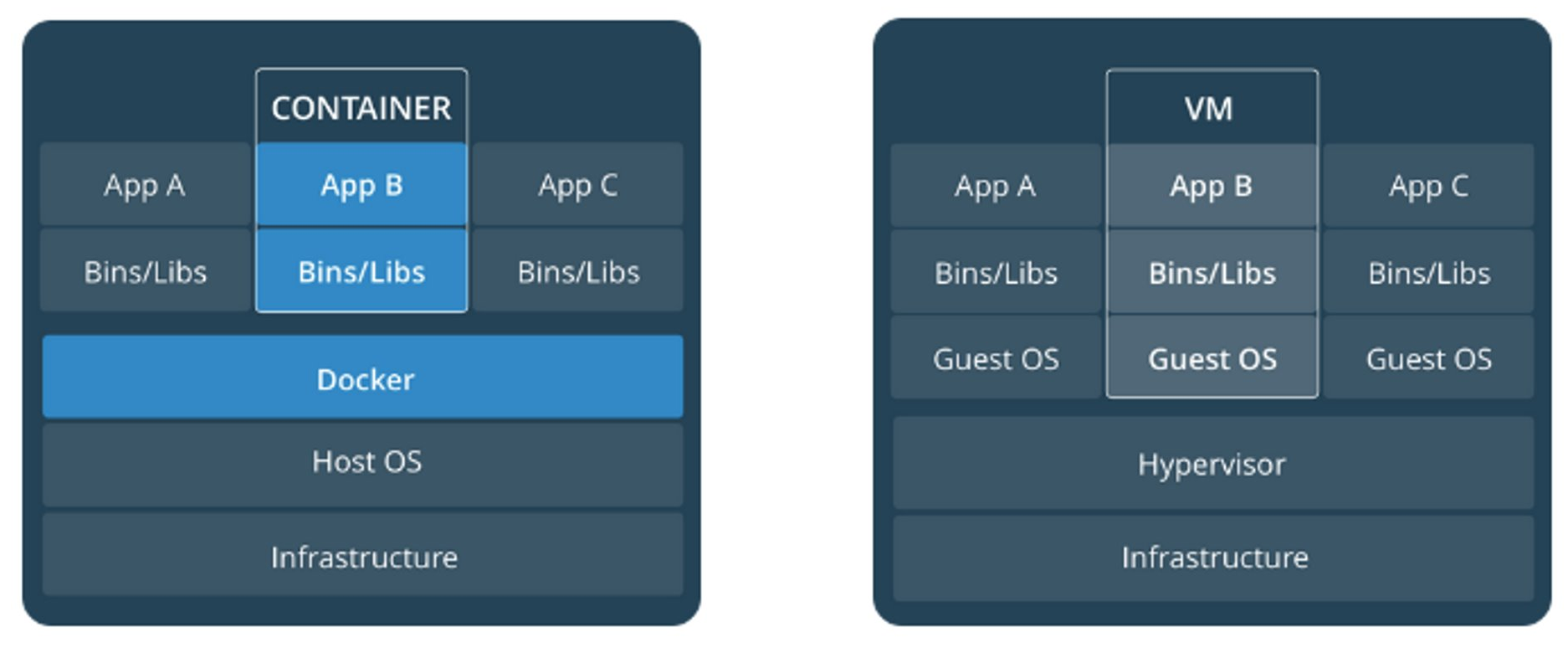
Docker vs Máquinas virtuales
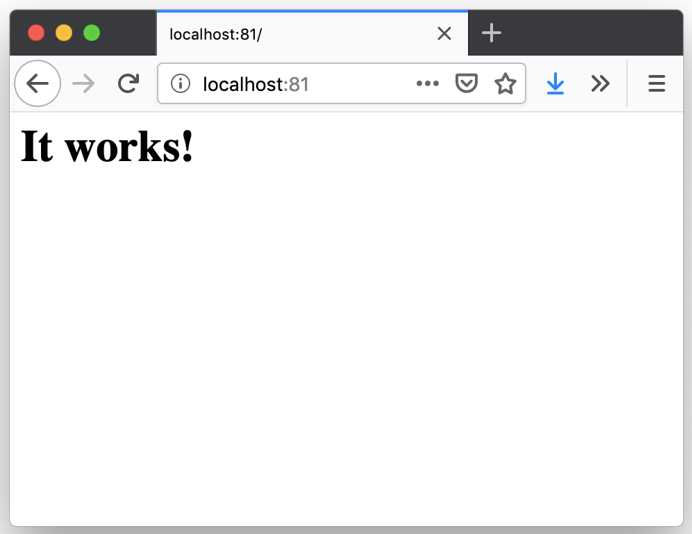
Despliegue de un contenedor
Al desplegar un contenedor s descarga su imagen al registro local
Enlace al ejemplo
Ejemplo01-Contenedor/crear-contenedor-apache.sh1
2
3
4
5
6
#!/bin/bash
docker run \
-d \
-p 81:80 \
--name myapache \
httpd
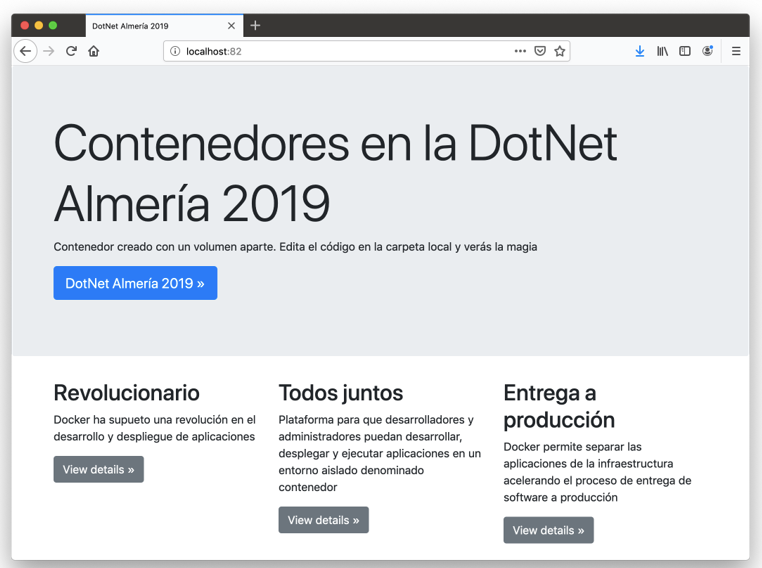
Despliegue de un contenedor con un volumen
-
Los contenedores son efímeros
-
El volumen es persistente
Código de la aplicación
Ejemplo02-Contenedor-con-volumen/myweb/index.php 1
2
3
4
5
6
7
8
9
10
11
12
13
14
15
16
17
18
19
20
21
22
23
24
25
26
27
28
29
30
31
32
33
34
35
36
37
38
39
40
41
42
43
44
45
46
47
48
49
50
51
52
53
54
55
56
57
58
59
60
61
62
63
64
65
66
67
68
69
70
71
72
73
74
75
76
77
78
79
80
<!doctype html>
<html lang="en">
<head>
<meta charset="utf-8">
<meta name="viewport" content="width=device-width, initial-scale=1, shrink-to-fit=no">
<meta name="description" content="">
<meta name="author" content="Mark Otto, Jacob Thornton, and Bootstrap contributors">
<meta name="generator" content="Jekyll v3.8.5">
<title>DotNet Almería 2019</title>
<link rel="canonical" href="https://getbootstrap.com/docs/4.3/examples/jumbotron/">
<!-- Bootstrap core CSS -->
<link href="https://getbootstrap.com/docs/4.3/dist/css/bootstrap.min.css" rel="stylesheet" integrity="sha384-ggOyR0iXCbMQv3Xipma34MD+dH/1fQ784/j6cY/iJTQUOhcWr7x9JvoRxT2MZw1T" crossorigin="anonymous">
<style>
.bd-placeholder-img {
font-size: 1.125rem;
text-anchor: middle;
-webkit-user-select: none;
-moz-user-select: none;
-ms-user-select: none;
user-select: none;
}
@media (min-width: 768px) {
.bd-placeholder-img-lg {
font-size: 3.5rem;
}
}
</style>
<!-- Custom styles for this template -->
<link href="jumbotron.css" rel="stylesheet">
</head>
<body>
<main role="main">
<!-- Main jumbotron for a primary marketing message or call to action -->
<div class="jumbotron">
<div class="container">
<h1 class="display-3">Contenedores en la DotNet Almería 2019</h1>
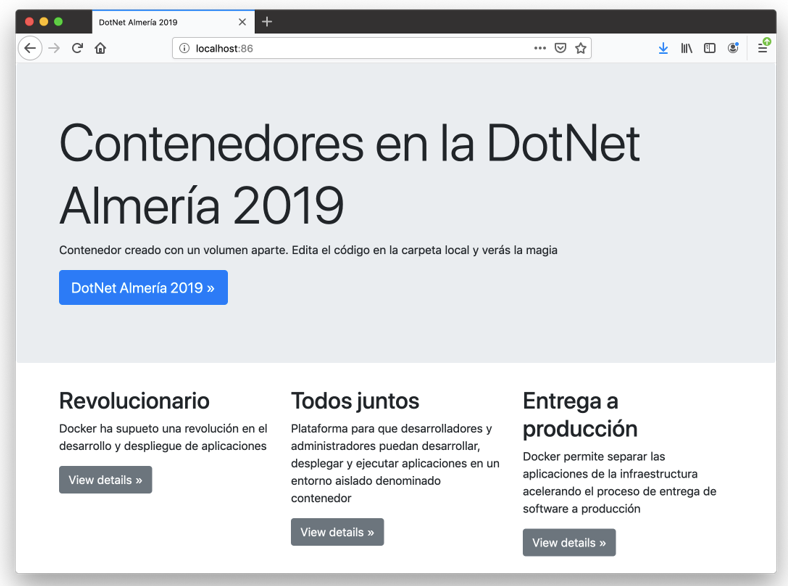
<p>Contenedor creado con un volumen aparte. Edita el código en la carpeta local y verás la magia</p>
<p><a class="btn btn-primary btn-lg" href="https://dotnetalmeriaconf.net/" role="button">DotNet Almería 2019 »</a></p>
</div>
</div>
<div class="container">
<!-- Example row of columns -->
<div class="row">
<div class="col-md-4">
<h2>Revolucionario</h2>
<p>Docker ha supueto una revolución en el desarrollo y despliegue de aplicaciones</p>
<p><a class="btn btn-secondary" href="#" role="button">View details »</a></p>
</div>
<div class="col-md-4">
<h2>Todos juntos</h2>
<p>Plataforma para que desarrolladores y administradores puedan desarrollar, desplegar y ejecutar aplicaciones en un entorno aislado denominado contenedor</p>
<p><a class="btn btn-secondary" href="#" role="button">View details »</a></p>
</div>
<div class="col-md-4">
<h2>Entrega a producción</h2>
<p>Docker permite separar las aplicaciones de la infraestructura acelerando el proceso de entrega de software a producción</p>
<p><a class="btn btn-secondary" href="#" role="button">View details »</a></p>
</div>
</div>
<hr>
</div> <!-- /container -->
</main>
<footer class="container">
<p>© DotNet Almería 2019</p>
</footer>
<script src="https://code.jquery.com/jquery-3.3.1.slim.min.js" integrity="sha384-q8i/X+965DzO0rT7abK41JStQIAqVgRVzpbzo5smXKp4YfRvH+8abtTE1Pi6jizo" crossorigin="anonymous"></script>
<script>window.jQuery || document.write('<script src="/docs/4.3/assets/js/vendor/jquery-slim.min.js"><\/script>')</script><script src="/docs/4.3/dist/js/bootstrap.bundle.min.js" integrity="sha384-xrRywqdh3PHs8keKZN+8zzc5TX0GRTLCcmivcbNJWm2rs5C8PRhcEn3czEjhAO9o" crossorigin="anonymous"></script></body>
</html>
Ejemplo02-Contenedor-con-volumen/crear-contenedor-apache-con-volumen.sh1
2
3
4
5
6
7
#!/bin/bash
docker run \
-d \
-p 82:80 \
-v "$PWD/myweb":/usr/local/apache2/htdocs/ \
--name myapache-vol \
httpd
Imágenes Docker interesantes
-
Servidores Web: Apache, Nginx, …
-
BD: MySQL, MongoDB, Redis, PostgreSQL, …
-
Sistemas operativos: Alpine, Ubuntu, …
-
Y muchas más: node, php, elasticsearch, haproxy, wordpress, rabbitmq, python, openjdk, tomcat, jenkins, redmine, flink, spark, …
Crear imagen propia
El Dockerfile:
-
Indica cómo y con qué construir la imagen
-
Produce repetibilidad
-
La imagen queda en el registro local
Ejemplo03-Image/Dockerfile1
2
FROM httpd:2.4
COPY ./myweb/ /usr/local/apache2/htdocs/
Crear imagen
Ejemplo03-Image/crear-imagen.sh1
2
#!/bin/bash
docker build -t dotnet2019web .
El código de la aplicación
Ejemplo03-Image/myweb/index.html 1
2
3
4
5
6
7
8
9
10
11
12
13
14
15
16
17
18
19
20
21
22
23
24
25
26
27
28
29
30
31
32
33
34
35
36
37
38
39
40
41
42
43
44
45
46
47
48
49
50
51
52
53
54
55
56
57
58
59
60
61
62
63
64
65
66
67
68
69
70
71
72
73
74
75
76
77
78
79
80
<!doctype html>
<html lang="en">
<head>
<meta charset="utf-8">
<meta name="viewport" content="width=device-width, initial-scale=1, shrink-to-fit=no">
<meta name="description" content="">
<meta name="author" content="Mark Otto, Jacob Thornton, and Bootstrap contributors">
<meta name="generator" content="Jekyll v3.8.5">
<title>DotNet Almería 2019</title>
<link rel="canonical" href="https://getbootstrap.com/docs/4.3/examples/jumbotron/">
<!-- Bootstrap core CSS -->
<link href="https://getbootstrap.com/docs/4.3/dist/css/bootstrap.min.css" rel="stylesheet" integrity="sha384-ggOyR0iXCbMQv3Xipma34MD+dH/1fQ784/j6cY/iJTQUOhcWr7x9JvoRxT2MZw1T" crossorigin="anonymous">
<style>
.bd-placeholder-img {
font-size: 1.125rem;
text-anchor: middle;
-webkit-user-select: none;
-moz-user-select: none;
-ms-user-select: none;
user-select: none;
}
@media (min-width: 768px) {
.bd-placeholder-img-lg {
font-size: 3.5rem;
}
}
</style>
<!-- Custom styles for this template -->
<link href="jumbotron.css" rel="stylesheet">
</head>
<body>
<main role="main">
<!-- Main jumbotron for a primary marketing message or call to action -->
<div class="jumbotron">
<div class="container">
<h1 class="display-3">Contenedores en la DotNet Almería 2019</h1>
<p>Contenedor creado con un volumen aparte. Edita el código en la carpeta local y verás la magia</p>
<p><a class="btn btn-primary btn-lg" href="https://dotnetalmeriaconf.net/" role="button">DotNet Almería 2019 »</a></p>
</div>
</div>
<div class="container">
<!-- Example row of columns -->
<div class="row">
<div class="col-md-4">
<h2>Revolucionario</h2>
<p>Docker ha supueto una revolución en el desarrollo y despliegue de aplicaciones</p>
<p><a class="btn btn-secondary" href="#" role="button">View details »</a></p>
</div>
<div class="col-md-4">
<h2>Todos juntos</h2>
<p>Plataforma para que desarrolladores y administradores puedan desarrollar, desplegar y ejecutar aplicaciones en un entorno aislado denominado contenedor</p>
<p><a class="btn btn-secondary" href="#" role="button">View details »</a></p>
</div>
<div class="col-md-4">
<h2>Entrega a producción</h2>
<p>Docker permite separar las aplicaciones de la infraestructura acelerando el proceso de entrega de software a producción</p>
<p><a class="btn btn-secondary" href="#" role="button">View details »</a></p>
</div>
</div>
<hr>
</div> <!-- /container -->
</main>
<footer class="container">
<p>© DotNet Almería 2019</p>
</footer>
<script src="https://code.jquery.com/jquery-3.3.1.slim.min.js" integrity="sha384-q8i/X+965DzO0rT7abK41JStQIAqVgRVzpbzo5smXKp4YfRvH+8abtTE1Pi6jizo" crossorigin="anonymous"></script>
<script>window.jQuery || document.write('<script src="/docs/4.3/assets/js/vendor/jquery-slim.min.js"><\/script>')</script><script src="/docs/4.3/dist/js/bootstrap.bundle.min.js" integrity="sha384-xrRywqdh3PHs8keKZN+8zzc5TX0GRTLCcmivcbNJWm2rs5C8PRhcEn3czEjhAO9o" crossorigin="anonymous"></script></body>
</html>
Despliegue de imagen creada
Ejemplo03-Image/crear-contenedor-dotnetalmeria2019.sh1
2
3
4
5
6
#!/bin/bash
docker run \
-d \
-p 83:80 \
--name myweb \
dotnet2019web
image::crear-imagen-propia.png
Subir imagen a Docker Hub
-
Docker Hub es un registro de imágenes público
-
La cuenta gratuita permite
-
Imágenes (repositorios) públicos indefinidos
-
Una imagen privada
-
Subida a Docker Hub
Ejemplo03-Image/subir-imagen.sh1
2
3
#!/bin/bash
docker tag dotnet2019web ualmtorres/dotnet2019web:v0
docker push ualmtorres/dotnet2019web:v0
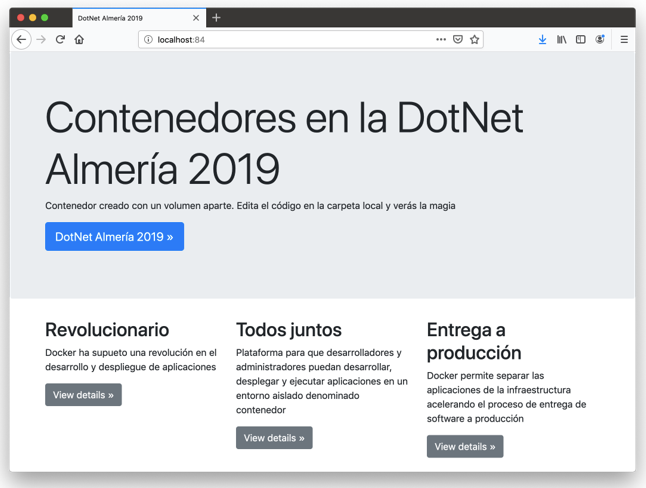
Despliegue de imagen subida
Ejemplo03-Image/crear-contenedor-dotnetalmeria2019-desde-dockerhub.sh1
2
3
4
5
6
#!/bin/bash
docker run \
-d \
-p 84:80 \
--name myweb-from-dockerhub \
ualmtorres/dotnet2019web:v0
Ciclo de desarrollo con Docker
-
Crear carpetas de desarrollo
-
Desplegar imagen de base
-
Crear Dockerfile
-
Iterar
-
Programar + Subir a repo
-
Crear imagen propia
-
Etiquetar como nueva versión
-
Subir nueva imagen a Docker Hub
-
Poner en producción
-
Docker Compose
-
Permite definir y ejecutar aplicaciones Docker con varios contenedores
-
Podemos tener varios entornos aislados (normalmente con nombre de directorio)
-
Sólo vuelve a crear los contenedores que hayan cambiado
Despliegue con Docker Compose
Ejemplo04-Docker-Compose/init.sql 1
2
3
4
5
6
7
8
9
10
11
12
13
14
15
16
17
18
19
20
21
22
23
24
25
26
27
28
29
30
31
32
33
34
35
36
37
38
39
40
41
42
43
44
45
46
47
48
49
50
51
52
53
54
55
56
57
58
59
60
61
62
63
64
65
66
67
68
69
70
71
72
73
74
75
76
77
78
CREATE SCHEMA IF NOT EXISTS SG;
USE SG;
DROP TABLE IF EXISTS s_customer;
CREATE TABLE s_customer
(id VARCHAR(3) NOT NULL,
name VARCHAR(20) NOT NULL,
phone VARCHAR(20) NOT NULL,
address VARCHAR(20),
city VARCHAR(20),
state VARCHAR(15),
country VARCHAR(20),
zip_code VARCHAR(15),
credit_rating VARCHAR(9),
sales_rep_id VARCHAR(3),
region_id VARCHAR(3),
comments VARCHAR(255),
CONSTRAINT s_customer_id_pk PRIMARY KEY (id),
CONSTRAINT s_customer_credit_rating_ck
CHECK (credit_rating IN ('EXCELLENT', 'GOOD', 'POOR'))
);
INSERT INTO s_customer VALUES ('301', 'Sports,Inc', '540-123-4567','72 High St',
'Harrisonburg', 'VA','US', '22809','EXCELLENT', '12', '1', NULL);
INSERT INTO s_customer VALUES ('302', 'Toms Sporting Goods', '540-987-6543','6741 Main St',
'Harrisonburg', 'VA','US', '22809','POOR', '14', '1', NULL);
INSERT INTO s_customer VALUES ('303', 'Athletic Attire', '540-123-6789','54 Market St',
'Harrisonburg', 'VA','US', '22808','GOOD', '14', '1', NULL);
INSERT INTO s_customer
VALUES ('304', 'Athletics For All', '540-987-1234','286 Main St', 'Harrisonburg', 'VA',
'US', '22808','EXCELLENT', '12', '1', NULL);
INSERT INTO s_customer VALUES ('305', 'Shoes for Sports', '540-123-9876','538 High St',
'Harrisonburg', 'VA','US', '22809','EXCELLENT', '14', '1', NULL);
INSERT INTO s_customer VALUES ('306', 'BJ Athletics', '540-987-9999','632 Water St',
'Harrisonburg', 'VA','US', '22810','POOR', '12', '1', NULL);
INSERT INTO s_customer VALUES ('403', 'Athletics One', '717-234-6786','912 Columbia Rd',
'Lancaster', 'PA','US', '17601','GOOD', '14', '1', NULL);
INSERT INTO s_customer VALUES ('404', 'Great Athletes', '717-987-2341','121 Litiz Pike',
'Lancaster', 'PA','US', '17602','EXCELLENT', '12', '1', NULL);
INSERT INTO s_customer VALUES ('405', 'Athletics Two', '717-987-9875','435 High Rd',
'Lancaster', 'PA','US', '17602','EXCELLENT', '14', '1', NULL);
INSERT INTO s_customer VALUES ('406', 'Athletes Attic', '717-234-9888','101 Greenfield Rd',
'Lancaster', 'PA','US', '17601','POOR', '12', '1', NULL);
INSERT INTO s_customer VALUES ('201', 'One Sport', '55-112066222','82 Via Bahia', 'Sao Paolo',
NULL, 'Brazil', NULL,'EXCELLENT', '12', '2', NULL);
INSERT INTO s_customer VALUES ('202', 'Deportivo Caracas', '58-28066222','31 Sabana Grande',
'Caracas', NULL, 'Venezuela', NULL,'EXCELLENT', '12', '2', NULL);
INSERT INTO s_customer VALUES ('203', 'New Delhi Sports', '91-11903338','11368 Chanakya',
'New Delhi', NULL, 'India', NULL,'GOOD', '11', '4', NULL);
INSERT INTO s_customer VALUES ('204', 'Ladysport', '1-206-104-0111','281 Queen Street',
'Seattle', 'Washington', 'US', NULL,'EXCELLENT', '11', '1', NULL);
INSERT INTO s_customer VALUES ('205', 'Kim''s Sporting Goods', '852-3693888','15 Henessey Road',
'Hong Kong', NULL, NULL, NULL,'EXCELLENT', '11', '4', NULL);
INSERT INTO s_customer VALUES ('206', 'Sportique', '33-93425722253','172 Rue de Place',
'Cannes', NULL, 'France', NULL,'EXCELLENT', '13', '5', NULL);
INSERT INTO s_customer VALUES ('207', 'Tall Rock Sports', '234-16036222','10 Saint Antoine',
'Lagos', NULL, 'Nigeria', NULL,'GOOD', NULL, '3', NULL);
INSERT INTO s_customer VALUES ('208', 'Muench Sports', '49-895274449','435 Gruenestrasse',
'Munich', NULL, 'Germany', NULL,'GOOD', '13', '5', NULL);
INSERT INTO s_customer VALUES ('209', 'Beisbol Si!', '809-352666','415 Playa Del Mar',
'San Pedro de Macoris', NULL, 'Dominican Republic', NULL, 'EXCELLENT', '11', '6', NULL);
INSERT INTO s_customer VALUES ('210', 'Futbol Sonora', '52-404555','5 Via Saguaro', 'Nogales',
NULL, 'Mexico', NULL,'EXCELLENT', '12', '2', NULL);
INSERT INTO s_customer VALUES ('211', 'Helmut''s Sports', '42-2111222','45 Modrany', 'Prague',
NULL, 'Czechoslovakia', NULL,'EXCELLENT', '11', '5', NULL);
INSERT INTO s_customer VALUES ('212', 'Hamada Sport', '20-31209222','47A Corniche',
'Alexandria', NULL, 'Egypt', NULL,'EXCELLENT', '13', '3', NULL);
INSERT INTO s_customer VALUES ('213', 'Sports Emporium', '1-415-555-6281','4783 168th Street',
'San Francisco', 'CA', 'US', NULL,'EXCELLENT', '11', '1', NULL);
INSERT INTO s_customer VALUES ('214', 'Sports Retail', '1-716-555-7777','115 Main Street',
'Buffalo', 'NY', 'US', NULL, 'POOR', '11', '1', NULL);
INSERT INTO s_customer VALUES ('215', 'Sports Russia', '7-0953892444','7070 Yekatamina',
'Saint Petersburg', NULL, 'Russia', NULL,'POOR', '11', '5', NULL);
COMMIT;
Ejemplo04-Docker-Compose/app/index.php 1
2
3
4
5
6
7
8
9
10
11
12
13
14
15
16
17
18
19
20
21
22
23
24
25
26
27
28
29
30
31
32
33
34
35
36
37
38
39
40
41
42
43
44
45
46
47
48
49
50
51
52
53
54
55
<html>
<head>
<meta charset="utf-8">
<meta http-equiv="X-UA-Compatible" content="IE=edge">
<title>Customer Catalog</title>
<link rel="stylesheet" href="https://stackpath.bootstrapcdn.com/bootstrap/4.1.1/css/bootstrap.min.css" integrity="sha384-WskhaSGFgHYWDcbwN70/dfYBj47jz9qbsMId/iRN3ewGhXQFZCSftd1LZCfmhktB" crossorigin="anonymous">
</head>
<body>
<div class = "container">
<div class="jumbotron">
<h1 class="display-4">Customer Catalog</h1>
<p class="lead">Customer Catalog Sample Application</p>
<hr class="my-4">
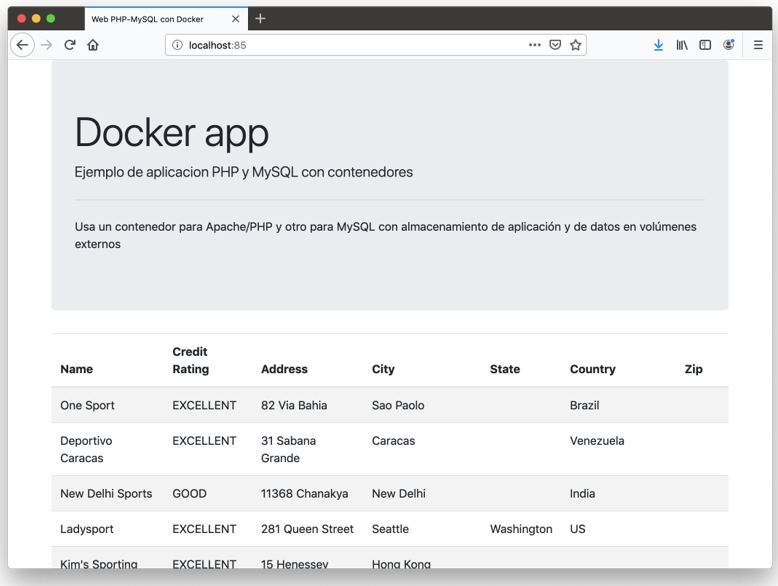
<p>PHP sample application connected to a MySQL database to list a customer catalog</p>
</div>
<table class="table table-striped table-responsive">
<thead>
<tr>
<th>Name</th>
<th>Credit Rating</th>
<th>Address</th>
<th>City</th>
<th>State</th>
<th>Country</th>
<th>Zip</th>
</tr>
</thead>
<tbody>
<?php
$conexion = mysqli_connect("mysql", "root", "secret", "SG");
$cadenaSQL = "select * from s_customer";
$sentencia = mysqli_prepare($cadenaSQL);
$resultado = mysqli_query($conexion, $cadenaSQL);
while ($fila = mysqli_fetch_object($resultado)) {
echo "<tr><td> " .$fila->name .
"</td><td>" . $fila->credit_rating .
"</td><td>" . $fila->address .
"</td><td>" . $fila->city .
"</td><td>" . $fila->state .
"</td><td>" . $fila->country .
"</td><td>" . $fila->zip_code .
"</td></tr>";
}
?>
</tbody>
</table>
</div>
<script src="https://code.jquery.com/jquery-3.3.1.slim.min.js" integrity="sha384-q8i/X+965DzO0rT7abK41JStQIAqVgRVzpbzo5smXKp4YfRvH+8abtTE1Pi6jizo" crossorigin="anonymous"></script>
<script src="https://cdnjs.cloudflare.com/ajax/libs/popper.js/1.14.3/umd/popper.min.js" integrity="sha384-ZMP7rVo3mIykV+2+9J3UJ46jBk0WLaUAdn689aCwoqbBJiSnjAK/l8WvCWPIPm49" crossorigin="anonymous"></script>
<script src="https://stackpath.bootstrapcdn.com/bootstrap/4.1.1/js/bootstrap.min.js" integrity="sha384-smHYKdLADwkXOn1EmN1qk/HfnUcbVRZyYmZ4qpPea6sjB/pTJ0euyQp0Mk8ck+5T" crossorigin="anonymous"></script>
</body>
</html>
Ejemplo04-Docker-Compose/docker-compose.yaml 1
2
3
4
5
6
7
8
9
10
11
12
13
14
15
16
17
18
19
20
21
version: '2'
services:
mysql:
container_name: my_mysql
restart: always
image: mysql:5.7
environment:
MYSQL_ROOT_PASSWORD: 'secret' # TODO: Change this
ports:
- "3306:3306"
volumes:
- ./data:/var/lib/mysql
- ./init.sql:/docker-entrypoint-initdb.d/init.sql
php:
container_name: my_php
restart: always
image: ualmtorres/phalcon-apache-ubuntu
ports:
- "85:80"
volumes:
- ./app:/var/www/html
Ejemplo04-Docker-Compose/lanzar-app-ejemplo.sh1
2
#!/bin/bash
docker-compose up -d
Ejemplo04-Docker-Compose/Dockerfile1
2
3
4
5
6
7
FROM ualmtorres/phalcon-apache-ubuntu
ADD ./app/ /var/www/html
VOLUME /var/www/html
EXPOSE 80
Ejemplo04-Docker-Compose/eliminar-app-ejemplo.sh1
2
#!/bin/bash
docker-compose down
Ciclo de desarrollo con Docker Compose
-
Crear carpetas de desarrollo
-
Crear docker-compose.yaml
-
Lanzar docker-compose.yaml
-
Crear Dockerfile
-
Iterar
-
Programar + Subir a repo
-
Crear imagen propia
-
Etiquetar como nueva versión
-
Subir nueva imagen a Docker Hub
-
Poner en producción
-
Kubernetes
-
Proyecto Open Source 2014
-
Plataforma para despliegue automático, escalado y gestión de aplicaciones contenedorizadas.
-
Permite el despliegue de aplicaciones en un cluster sin pensar en las máquinas que lo soportan
-
Ofrece:
-
Replicación
-
(Auto)escalado
-
Arquitectura de Kubernetes
-
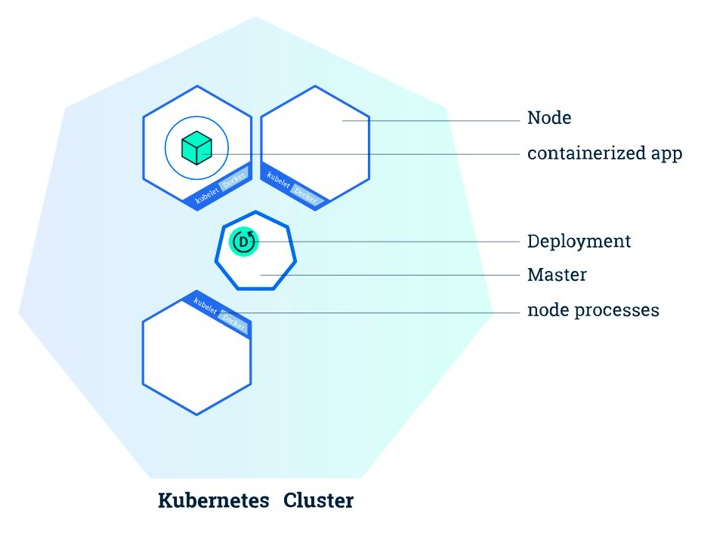
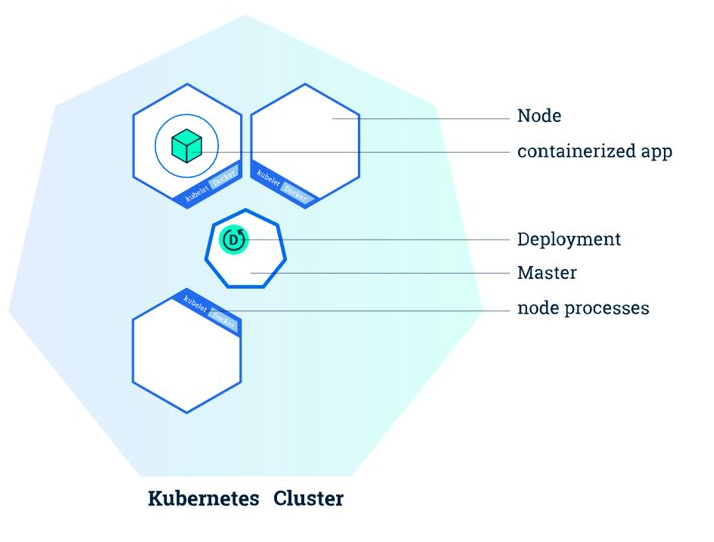
El Master inicia los contenedores de la aplicación.
-
El máster organiza los contenedores para que se ejecuten en los nodos del cluster.
-
Los nodos interactúan con el master informando del estado de los pods
Dónde usar Kubernetes
-
Local (desarrollo)
-
Minikube
-
-
Cloud
-
AKS (Azure Kubernetes Service)
-
GKE (Google Kubernetes Engine)
-
EKS (Amazon Elastic Kubernetes Service)
-
…
-
-
On premise
-
OpenStack (IaaS) + Rancher (k8s)
-
…
-
Ejemplo de coste diario en AKS
-
4 nodos
-
Características nodos
-
2 vcpu
-
7 GB RAM
-
32 GB HDD
-
-
Coste diario total (6.5 EUR)
-
4.6 EUR MV
-
1 EUR almacenamiento
-
0.9 EUR Log analytics
-
kubectl
CLI para Kubernetes
Bloques de ~/.kube/config:
-
Clusters (nombre, IP, certificado, …)
-
Contextos (nombre, cluster, usuario)
-
Usuarios (nombre, certificados, tokens, …)
Uso:
-
Despliegue:
$ kubectl apply -f <manifiesto.yaml> -
Destrucción:
$ kubectl delete <manifiesto.yaml> -
Información:
$ kubectl get [pods | deployments | services | hpa | namespaces | …]
Obtener credenciales AKS para kubectl
-
Usar Cloud Shell
$ az aks get-credentials \ --resource-group <myResourceGroup> \ --name <myAKSCluster> -
El resultado está en
~/.kube/configde Azure Cloud Shell-
Cluster info
-
Context info
-
User info
-
-
Pegar esos datos en
~/.kube/configdel equipo de desarrollo
Contextos
Configura kubectl contra un cluster Kubernetes
Comandos:
$ kubectl config get-contexts
$ kubectl config use-context mtorres-kube-clusterObjetos de Kubernetes. Pod
-
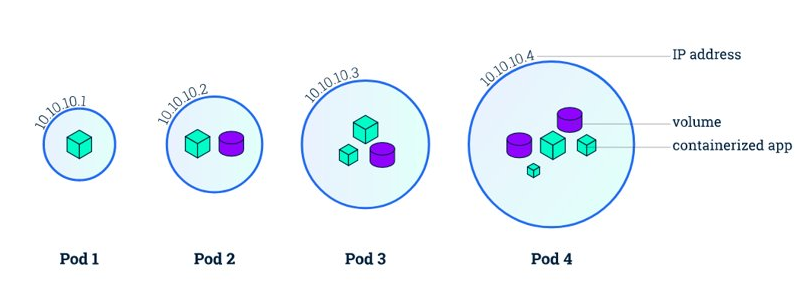
Grupo de uno o más contenedores de una aplicación y algunos recursos compartidos de esos contenedores (p.e. volúmenes, redes)
-
Contenedores auxiliares en un pod:
-
Proxy
-
Volcado de logs
-
Certificado SSL
-
Despliegue de un pod
Ejemplo05-Pod/pod-dotnet2019.yaml1
2
3
4
5
6
7
8
apiVersion: v1
kind: Pod
metadata:
name: dotnet2019
spec:
containers:
- name: dotnet2019
image: ualmtorres/dotnet2019web:v0
Ejemplo05-Pod/lanzar-ejemplo.sh1
2
3
4
#!/bin/bash
kubectl apply -f pod-dotnet2019.yaml
kubectl get pods --watch
sudo kubectl port-forward dotnet2019 86:80
Objetos de Kubernetes. Deployment
-
Declaración de los pods de una aplicación (servicio)
-
Imagen de base
-
Puertos
-
Volúmenes
-
Número de réplicas
-
Recursos demandados (cpu, RAM)
-
Límites para autoescalado
-
…
-
Ejemplo06-Deployment/deployment-api.yaml 1
2
3
4
5
6
7
8
9
10
11
12
13
14
15
16
17
18
19
20
21
22
23
24
25
26
27
28
29
30
31
32
apiVersion: apps/v1
kind: Deployment
metadata:
name: selectividad-api
namespace: default
labels:
app: selectividad-api
spec:
revisionHistoryLimit: 2
strategy:
type: RollingUpdate
selector:
matchLabels:
app: selectividad-api
template:
metadata:
labels:
app: selectividad-api
spec:
containers:
- name: selectividad-api
image: ualmtorres/selectividad-api:v2
ports:
- name: http
containerPort: 80
resources:
requests:
cpu: 100m
memory: 128Mi
limits:
cpu: 250m
memory: 256Mi
Ejemplo06-Deployment/deployment-front.yaml 1
2
3
4
5
6
7
8
9
10
11
12
13
14
15
16
17
18
19
20
21
22
23
24
25
26
27
28
29
30
31
32
apiVersion: apps/v1
kind: Deployment
metadata:
name: selectividad-front
namespace: default
labels:
app: selectividad-front
spec:
revisionHistoryLimit: 2
strategy:
type: RollingUpdate
selector:
matchLabels:
app: selectividad-front
template:
metadata:
labels:
app: selectividad-front
spec:
containers:
- name: selectividad-front
image: ualmtorres/selectividad-front:v2
ports:
- name: http
containerPort: 80
resources:
requests:
cpu: 100m
memory: 128Mi
limits:
cpu: 250m
memory: 256Mi
Ejemplo06-Deployment/lanzar-ejemplo.sh1
2
3
4
5
#!/bin/bash
kubectl apply -f deployment-api.yaml
kubectl apply -f deployment-front.yaml
kubectl get deployments --watch
sudo kubectl port-forward `kubectl get pods | grep 'selectividad-front' | awk '{print $1}'` 86:80
Objetos de Kubernetes. Service
-
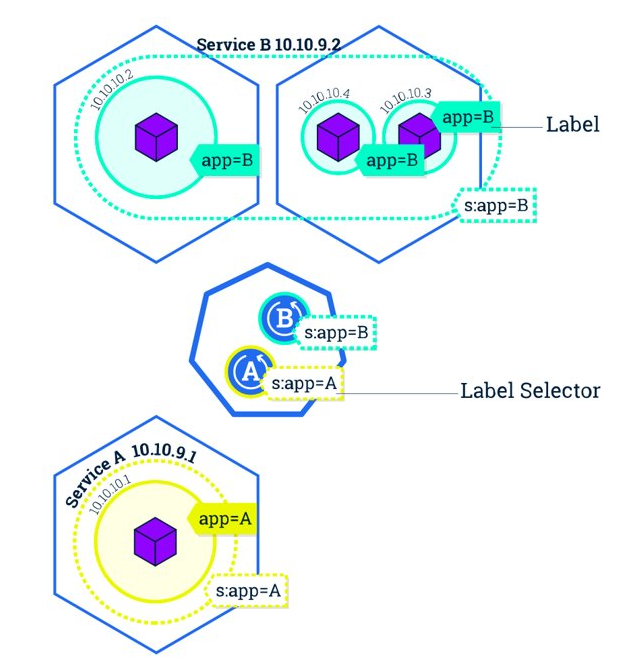
Los servicios son una abstracción que definen un conjunto lógico de pods y una política de acceso a ellos estableciendo un nombre para acceder a ellos
-
Cada pod tiene una dirección IP única, pero esa IP no se expone fuera del cluster sin lo que se denomina un Servicio
-
Los servicios pemiten que las aplicaciones reciban tráfico
-
ClusterIP: Servicio con IP interna a nivel de cluster
-
NodePort: Servicio expuesto fuera del cluster concatenando IP del nodo con puerto [30000-32767]
-
LoadBalancer: Ofrece una IP externa
-
ExternalName: Expone el servicio usando un nombre arbitrario
-
-
Enrutado de tráfico entre pods proporcionando una abstracción que permite que los pods mueran y se repliquen sin impactar en la aplicación.
-
Gestionan el descubrimiento y enrutado entre pods dependientes (p.e. frontend y backend)
Despliegue de un Service
Ejemplo07-Service/deployment-api.yaml 1
2
3
4
5
6
7
8
9
10
11
12
13
14
15
16
17
18
19
20
21
22
23
24
25
26
27
28
29
30
31
32
apiVersion: apps/v1
kind: Deployment
metadata:
name: selectividad-api
namespace: default
labels:
app: selectividad-api
spec:
revisionHistoryLimit: 2
strategy:
type: RollingUpdate
selector:
matchLabels:
app: selectividad-api
template:
metadata:
labels:
app: selectividad-api
spec:
containers:
- name: selectividad-api
image: ualmtorres/selectividad-api:v2
ports:
- name: http
containerPort: 80
resources:
requests:
cpu: 100m
memory: 128Mi
limits:
cpu: 250m
memory: 256Mi
Ejemplo07-Service/deployment-front.yaml 1
2
3
4
5
6
7
8
9
10
11
12
13
14
15
16
17
18
19
20
21
22
23
24
25
26
27
28
29
30
31
32
apiVersion: apps/v1
kind: Deployment
metadata:
name: selectividad-front
namespace: default
labels:
app: selectividad-front
spec:
revisionHistoryLimit: 2
strategy:
type: RollingUpdate
selector:
matchLabels:
app: selectividad-front
template:
metadata:
labels:
app: selectividad-front
spec:
containers:
- name: selectividad-front
image: ualmtorres/selectividad-front:v2
ports:
- name: http
containerPort: 80
resources:
requests:
cpu: 100m
memory: 128Mi
limits:
cpu: 250m
memory: 256Mi
Ejemplo07-Service/services.yaml 1
2
3
4
5
6
7
8
9
10
11
12
13
14
15
16
17
18
19
20
21
apiVersion: v1
kind: Service
metadata:
name: selectividad-api
spec:
type: ClusterIP
ports:
- port: 80
selector:
app: selectividad-api
---
apiVersion: v1
kind: Service
metadata:
name: selectividad-front
spec:
type: LoadBalancer
ports:
- port: 80
selector:
app: selectividad-front
Ejemplo07-Service/lanzar-ejemplo.sh1
2
3
4
5
6
7
8
9
#!/bin/bash
kubectl apply -f deployment-api.yaml
kubectl apply -f deployment-front.yaml
kubectl apply -f services.yaml
kubectl get deployments --watch
kubectl get services --watch
EXTERNAL_IP=`kubectl get services | grep "selectividad-front" | awk '{print $4}'`
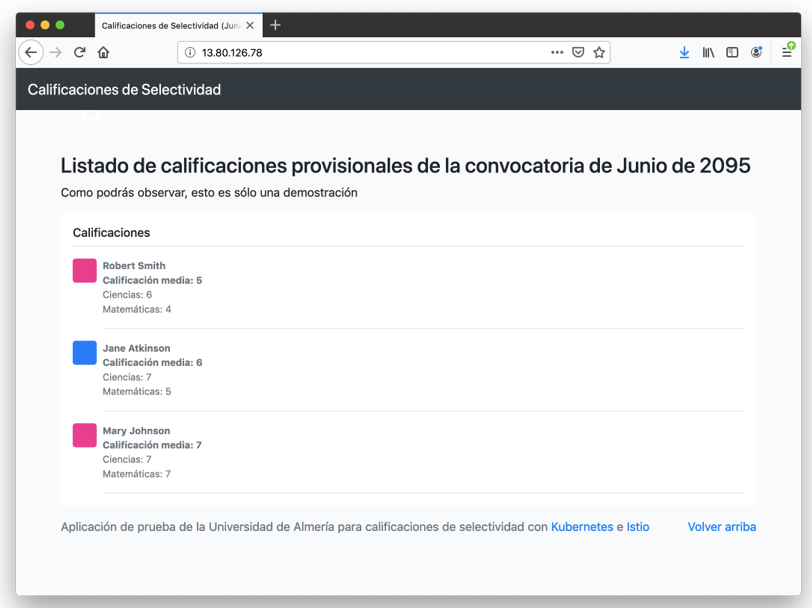
echo -e "Abre en un navegador la EXTERNAL-IP: \033[0;31m${EXTERNAL_IP} \033[0;39m del servicio selectividad-front"
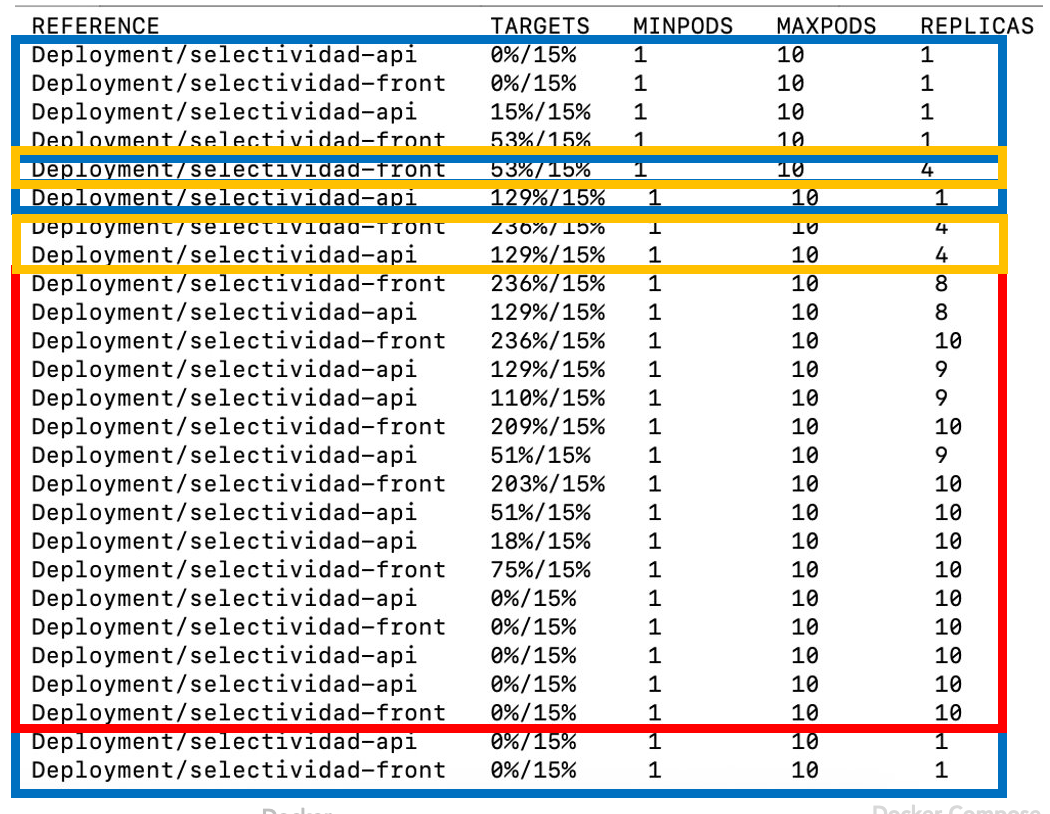
Objetos de Kubernetes. HorizontalPodAutoscaler
-
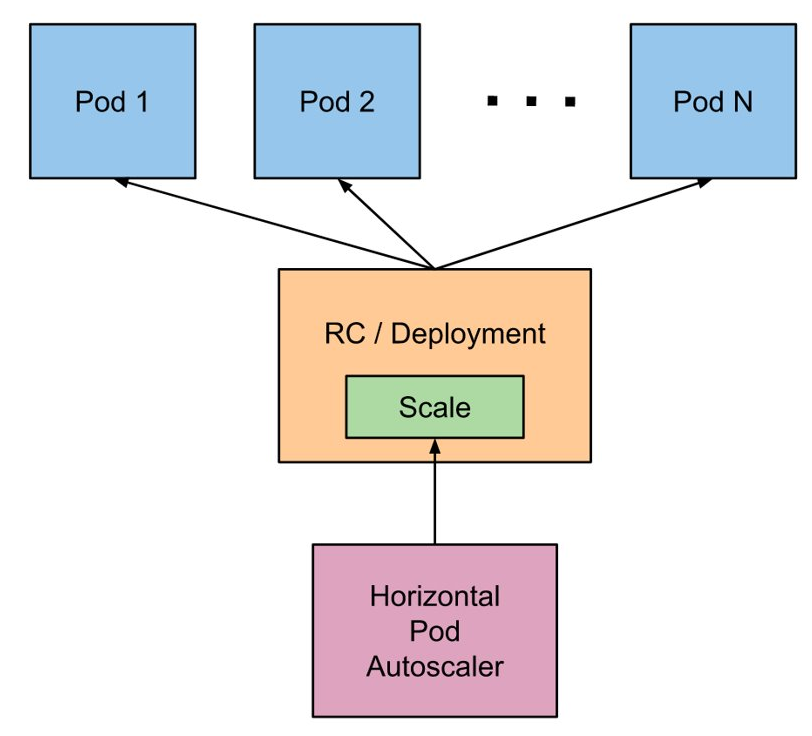
Consulta cada 15s las métricas de uso (CPU, RAM, …) de cada pod
-
Fija un mínimo y máximo de réplicas de un deployment
-
Define las condiciones de stress (p.e. porcentaje de uso de la CPU)
-
Ante stress escala hacia arriba
-
5m sin stress escala hacia abajo
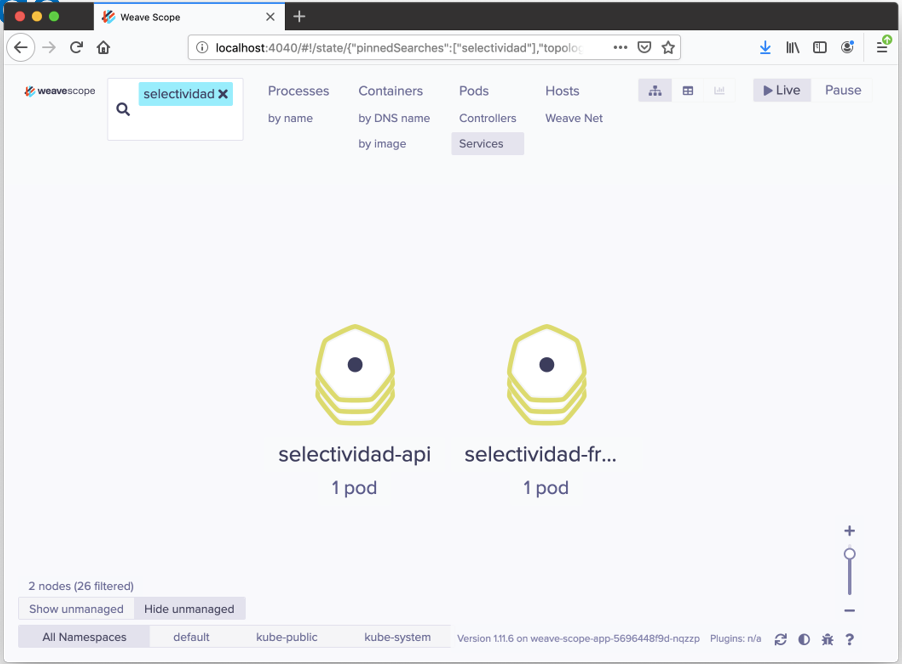
Herramienta de Visualización y Monitorización de Docker y Kubernetes
Ejemplo08-Autoscaling/lanzar-weavescope.sh1
2
3
#!/bin/bash
kubectl apply -f "https://cloud.weave.works/k8s/scope.yaml?k8s-version=$(kubectl version | base64 | tr -d '\n')"
kubectl port-forward -n weave "$(kubectl get -n weave pod --selector=weave-scope-component=app -o jsonpath='{.items..metadata.name}')" 4040
Autoescalado
Nos basamos en los mismos archivos de despliegue de la API, Front y Service, pero añadimos el autoescalado (HPA)
Ejemplo08-Autoscaling/deployment-api.yaml 1
2
3
4
5
6
7
8
9
10
11
12
13
14
15
16
17
18
19
20
21
22
23
24
25
26
27
28
29
30
31
32
apiVersion: apps/v1
kind: Deployment
metadata:
name: selectividad-api
namespace: default
labels:
app: selectividad-api
spec:
revisionHistoryLimit: 2
strategy:
type: RollingUpdate
selector:
matchLabels:
app: selectividad-api
template:
metadata:
labels:
app: selectividad-api
spec:
containers:
- name: selectividad-api
image: ualmtorres/selectividad-api:v2
ports:
- name: http
containerPort: 80
resources:
requests:
cpu: 100m
memory: 128Mi
limits:
cpu: 250m
memory: 256Mi
Ejemplo08-Autoscaling/deployment-front.yaml 1
2
3
4
5
6
7
8
9
10
11
12
13
14
15
16
17
18
19
20
21
22
23
24
25
26
27
28
29
30
31
32
apiVersion: apps/v1
kind: Deployment
metadata:
name: selectividad-front
namespace: default
labels:
app: selectividad-front
spec:
revisionHistoryLimit: 2
strategy:
type: RollingUpdate
selector:
matchLabels:
app: selectividad-front
template:
metadata:
labels:
app: selectividad-front
spec:
containers:
- name: selectividad-front
image: ualmtorres/selectividad-front:v2
ports:
- name: http
containerPort: 80
resources:
requests:
cpu: 100m
memory: 128Mi
limits:
cpu: 250m
memory: 256Mi
Ejemplo08-Autoscaling/services.yaml 1
2
3
4
5
6
7
8
9
10
11
12
13
14
15
16
17
18
19
20
21
apiVersion: v1
kind: Service
metadata:
name: selectividad-api
spec:
type: ClusterIP
ports:
- port: 80
selector:
app: selectividad-api
---
apiVersion: v1
kind: Service
metadata:
name: selectividad-front
spec:
type: LoadBalancer
ports:
- port: 80
selector:
app: selectividad-front
Ejemplo08-Autoscaling/autoscaler.yaml 1
2
3
4
5
6
7
8
9
10
11
12
13
14
15
16
17
18
19
20
21
22
23
24
25
apiVersion: autoscaling/v1
kind: HorizontalPodAutoscaler
metadata:
name: selectividad-api
spec:
scaleTargetRef:
apiVersion: apps/v1beta1
kind: Deployment
name: selectividad-api
minReplicas: 1
maxReplicas: 10
targetCPUUtilizationPercentage: 15
---
apiVersion: autoscaling/v1
kind: HorizontalPodAutoscaler
metadata:
name: selectividad-front
spec:
scaleTargetRef:
apiVersion: apps/v1beta1
kind: Deployment
name: selectividad-front
minReplicas: 1
maxReplicas: 10
targetCPUUtilizationPercentage: 15
Ejemplo08-Autoscaling/lanzar-ejemplo-autoscaler.sh 1
2
3
4
5
6
7
8
9
10
11
12
13
#!/bin/bash
kubectl apply -f deployment-api.yaml
kubectl apply -f deployment-front.yaml
kubectl apply -f services.yaml
kubectl get deployments --watch
kubectl get services --watch
EXTERNAL_IP=`kubectl get services | grep "selectividad-front" | awk '{print $4}'`
echo -e "Abre en un navegador la EXTERNAL-IP: \033[0;31m${EXTERNAL_IP} \033[0;39m del servicio selectividad-front"
kubectl apply -f autoscaler.yaml
kubectl get hpa --watch
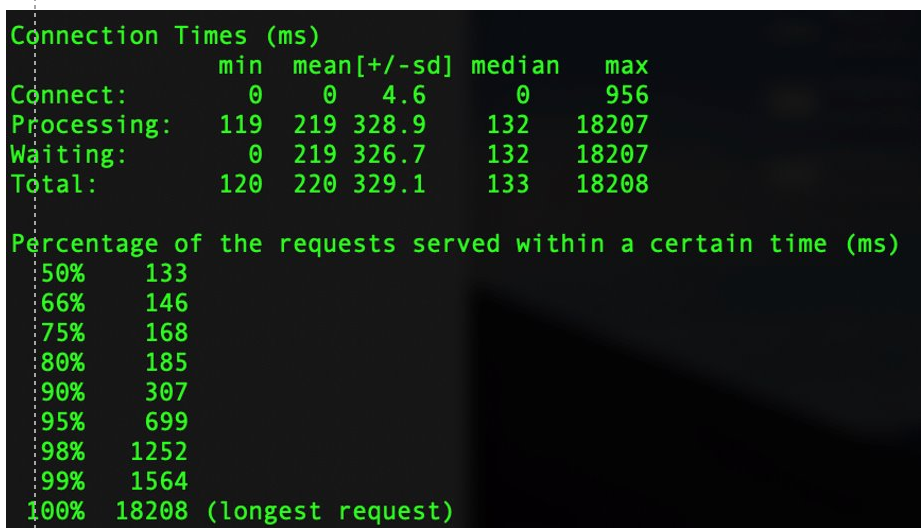
Prueba de stress con Apache Benchmark
-
100.000 peticiones totales
-
100 peticiones simultáneas
$ ab -n 100000 -c 100 http://13.80.126.78/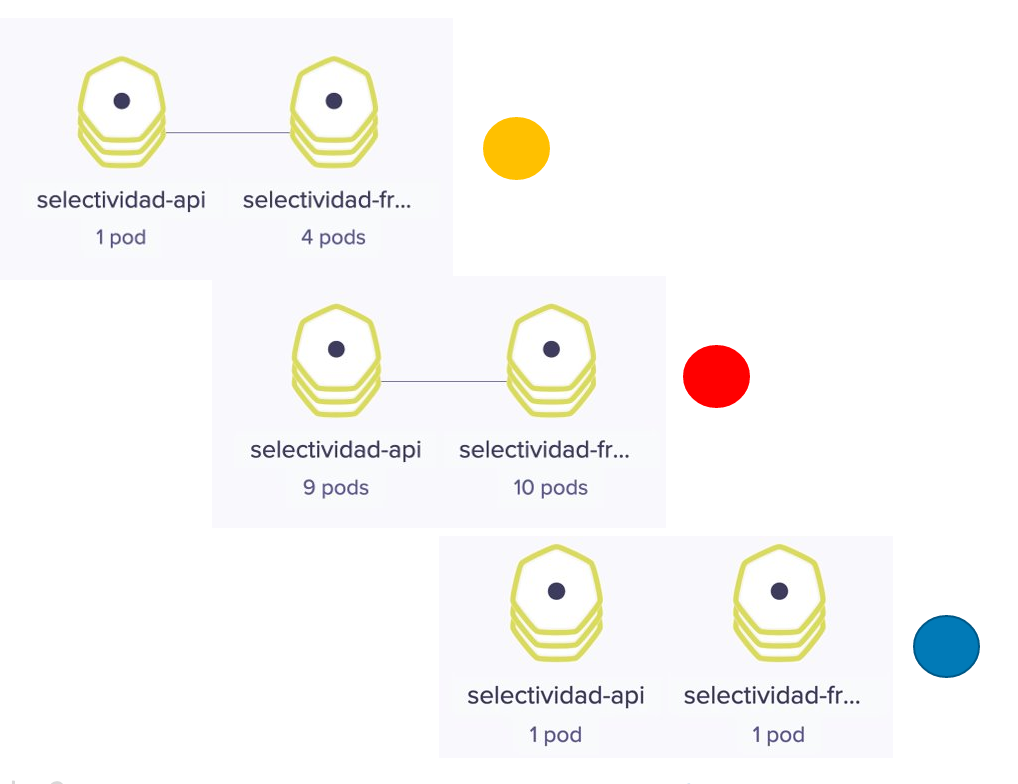
Ciclo de desarrollo con Kubernetes
-
Crear carpetas de desarrollo
-
Crear docker-compose.yaml
-
Lanzar docker-compose.yaml
-
Crear Dockerfile
-
Iterar:
-
Programar + Subir a repo
-
Crear imagen propia
-
Etiquetar como nueva versión
-
Subir nueva imagen a Docker Hub
-
Poner en producción
-
Istio
Ejemplo09-Istio/selectividad.yaml 1
2
3
4
5
6
7
8
9
10
11
12
13
14
15
16
17
18
19
20
21
22
23
24
25
26
27
28
29
30
31
32
33
34
35
36
37
38
39
40
41
42
43
44
45
46
47
48
49
50
51
52
53
54
55
56
57
58
59
60
61
62
63
64
65
66
67
68
69
70
71
72
73
74
75
76
77
78
79
80
81
82
83
84
85
86
87
88
89
90
91
92
93
94
95
96
97
98
99
100
101
102
103
104
105
106
107
108
109
##################################################################################################
# selectividad-api service
##################################################################################################
apiVersion: v1
kind: Service
metadata:
name: selectividad-api
labels:
app: selectividad-api
service: selectividad-api
spec:
ports:
- port: 80
name: http
selector:
app: selectividad-api
---
apiVersion: apps/v1
kind: Deployment
metadata:
name: selectividad-api-v1
labels:
app: selectividad-api
version: v1
spec:
replicas: 1
selector:
matchLabels:
app: selectividad-api
version: v1
template:
metadata:
labels:
app: selectividad-api
version: v1
spec:
containers:
- name: selectividad-api
image: ualmtorres/selectividad-api:v1
imagePullPolicy: IfNotPresent
ports:
- containerPort: 80
---
apiVersion: apps/v1
kind: Deployment
metadata:
name: selectividad-api-v2
labels:
app: selectividad-api
version: v2
spec:
replicas: 1
selector:
matchLabels:
app: selectividad-api
version: v2
template:
metadata:
labels:
app: selectividad-api
version: v2
spec:
containers:
- name: selectividad-api
image: ualmtorres/selectividad-api:v2
imagePullPolicy: IfNotPresent
ports:
- containerPort: 80
---
##################################################################################################
# selectividad-front services
##################################################################################################
apiVersion: v1
kind: Service
metadata:
name: selectividad-front
labels:
app: selectividad-front
service: selectividad-front
spec:
ports:
- port: 80
name: http
selector:
app: selectividad-front
---
apiVersion: apps/v1
kind: Deployment
metadata:
name: selectividad-front
labels:
app: selectividad-front
spec:
replicas: 1
selector:
matchLabels:
app: selectividad-front
template:
metadata:
labels:
app: selectividad-front
spec:
containers:
- name: selectividad-front
image: ualmtorres/selectividad-front:v1
imagePullPolicy: IfNotPresent
ports:
- containerPort: 80
---
Ejemplo09-Istio/selectividad-destination-rule.yaml 1
2
3
4
5
6
7
8
9
10
11
12
13
14
apiVersion: networking.istio.io/v1alpha3
kind: DestinationRule
metadata:
name: sel
spec:
host: selectividad-api
subsets:
- name: v1
labels:
version: v1
- name: v2
labels:
version: v2
---
Ejemplo09-Istio/virtual-service-selectividad-front-80v1-20v2.yaml 1
2
3
4
5
6
7
8
9
10
11
12
13
14
15
16
17
18
apiVersion: networking.istio.io/v1alpha3
kind: VirtualService
metadata:
name: selectividad-api
spec:
hosts:
- selectividad-api
http:
- route:
- destination:
host: selectividad-api
subset: v1
weight: 80
- destination:
host: selectividad-api
subset: v2
weight: 20
---
Ejemplo09-Istio/lanzar-ejemplo-istio.sh1
2
3
4
#!/bin/bash
kubectl apply -f selectividad.yaml
kubectl apply -f selectividad-destination-rule.yaml
kubectl apply -f virtual-service-selectividad-front-80v1-20v2.yaml